
Building a Custom CRM Your Team Will Actually Use
Most custom CRMs fail not because the engineering is wrong, but because the data model fights the way the team actually sells. Here is the build approach that produces a CRM operators open every day.
The first custom CRM I shipped did everything wrong. We modeled accounts, contacts, opportunities the way Salesforce did. We invented our own pipeline-stage enum. We hand-rolled reporting because “we will move to Snowflake later.” Six months in, the sales team was still using Google Sheets next to it because the CRM did not match how they actually sold.
That was a lifetime ago in CRM-product years. Since then I have shipped close to a dozen CRM development builds — some custom, some on top of Salesforce or HubSpot, some hybrid. The lesson that compounds across all of them is the same: a CRM your team will use is one shaped around the motion, not the motion shaped around the CRM.
This is what I would tell my past self about building a custom CRM that actually gets opened on Monday morning.
When custom is the right answer
Most teams should not build a custom CRM. Salesforce and HubSpot exist for a reason — they cover most B2B SaaS sales motions cleanly, the ecosystem apps are real value, and the pricing crossover only flips at meaningful scale.
The signals that point toward custom are narrow. I look for three:
- The sales motion does not fit a pipeline-stage model. Marketplaces, freight, multi-tenant B2B platforms — they sell continuously, in batches, or through events that no preset stage system represents cleanly.
- Critical data lives in objects the platform cannot represent without violence. When you find yourself adding the seventh custom object and the fifth Apex trigger, you have outgrown the platform.
- You expect the model to keep evolving for two years. Platform CRMs reward stability; they punish iteration. If the model itself is the product, custom usually wins.
If none of those hit, extend Salesforce or HubSpot. The studio’s comparison guide and HubSpot version lay out the side-by-side. This post is for the cases where custom is the right call.
Modeling the motion before modeling the data
The single most expensive mistake on a custom CRM build is to start with the schema. Schemas come from motions, not the other way around.
The first sprint I run with every CRM team is a modeling sprint. We sit with the actual revenue team — the SDRs, the AEs, the customer-success leads, ops — and we trace one real deal end-to-end. Where did the lead come from? Who looked at it first? What questions did they ask? What did the prospect’s account team look like? When did money first move? What changed three months in?
By the end of the week we have a domain model the revenue team recognizes. Not “Account, Contact, Opportunity” — those are too generic. Something closer to “Brand, Buying Group, Pilot, Activated Account, Renewal Window,” because that is how the team actually thinks.
The schema falls out of that. Three or four core entities, each with a clear meaning, named in the language the team already uses.
The activity stream is where the value lives
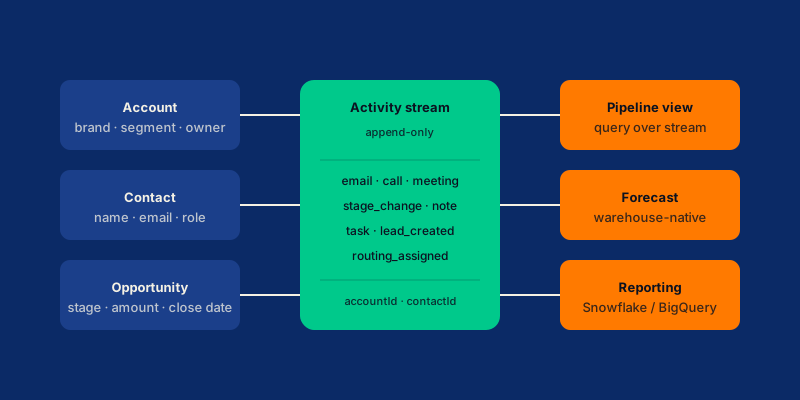
The most important architectural decision I make on any CRM build is to model activities as the truth and state as a query.
Every email, every call, every meeting, every deal-stage change, every note becomes an entry in an append-only activities table. The pipeline view, the forecast, the rep dashboard — all of these are queries over the activity stream.
interface Activity {
  id: string;
  type:
    | "email"
    | "call"
    | "meeting"
    | "stage_change"
    | "note"
    | "task"
    | "lead_created";
  accountId: string;
  contactId: string | null;
  opportunityId: string | null;
  actorId: string;       // user or "system"
  occurredAt: string;    // ISO 8601
  payload: Record<string, unknown>;
}
Three properties this gives you for free:
- Audit-grade history. Every change is a row. Nobody can quietly edit a stage to make their forecast look better.
- Trivial reporting. Pipeline by stage at any historical timestamp is one query. Forecast variance over time is one query. Funnel conversion by source is one query.
- Pluggable integrations. Email, calendar, calling, billing, and warehouse sync each become an activity-emitter. Adding a new integration is a new emitter, not a schema change.
I have shipped this exact shape on every custom CRM I have built since 2019. It compounds.
Lead routing as a documented rule chain
Lead routing is the part most teams under-engineer until ops starts complaining. The first version is a Salesforce assignment rule or a HubSpot workflow that nobody on engineering can debug. Six months later, “why did this lead go to me” is a 30-minute meeting.
The pattern that holds up: routing as a documented, configurable, auditable rule chain.
const rules = [
  matchedAccount,
  byTerritory,
  byScore,
  capacityAwareRoundRobin,
  fallbackQueue,
];
Each rule is its own function. The chain is data, not code. Every assignment writes an activity with the rule that fired and the input data that made it fire. Ops can answer “why did this lead go to me” with a single query.
A subtle but important pattern: route asynchronously, but commit synchronously. The form submit returns 200 the moment the lead is in the database; the assignment runs in a worker that completes within seconds. This decouples form latency from rule complexity, which compounds as the rule chain grows.
Pipeline stages are configuration, not enums
Sales teams change stages constantly. Renamed stages, reordered stages, new stages added, old ones merged. Hard-coding stages as a database enum guarantees you will be doing migrations every quarter.
The pattern: an opportunity_stages config table that the application reads at decision time. Stages are strings. The order is a sort_order column. The display name is a label column. Adding a stage is a row insert; reordering is a column update.
The cost of this is small (one extra query, easily cached). The benefit is that sales ops can iterate on the stage definition without an engineering ticket. Over a multi-year build, this saves more time than almost any other single decision.
Reporting on the warehouse, not the OLTP
Pipeline reports, forecast queries, win/loss analysis — all of these run on Snowflake or BigQuery, not the application database. The CRM’s primary job is to write activities and serve operator-facing reads. The warehouse’s job is to serve reporting.
The sync is one-way. A scheduled job copies new activity rows to the warehouse every 5 to 15 minutes. The warehouse stores the full historical activity stream. dbt models on top produce the pipeline cube, the forecast cube, the funnel cube. BI tools (Looker, Mode, Metabase) and the in-app reporting layer both query those cubes.
This separation is what lets you ship custom reports in days instead of months. Sales ops can write SQL against dbt models without engineering involvement. Engineering does not field “can you add this column to the report” tickets every week.
The reverse-sync direction matters too. Tools like Hightouch or Census push enriched warehouse data back into the CRM — account ownership from your CDP, lead scores from your model, intent signals from your data team. The CRM becomes the operator surface; the warehouse remains the source of truth.
Integrations behind a clean interface
A CRM that does not integrate with the rest of the revenue stack is a database with extra steps. The integrations that matter most: email (Gmail, Outlook), calendar, calling (Outreach, Salesloft, Aircall), billing (Stripe, Recurly, Chargebee), and warehouse sync.
The shape that scales: every integration sits behind an interface, every integration’s output becomes an activity in the stream.
interface EmailAdapter {
  ingest(message: RawEmail): Promise<Activity>;
  send(opp: OpportunityRef, draft: EmailDraft): Promise<Activity>;
}GmailAdapter, OutlookAdapter, SuperhumanAdapter all implement the same shape. The CRM talks to the interface. Switching providers is an adapter swap, not a refactor.
This sounds like over-engineering on day one. It is not. By month six, every CRM I have shipped has changed at least one of these vendors. The interface is what makes that a one-week task instead of a one-quarter project.
What ships in the first 12 weeks
A focused custom CRM MVP that a sales team will actually use, in one quarter:
Weeks 1–2: Modeling sprint. Domain model, schema sketch, integration list, reporting list, migration plan from the legacy system.
Weeks 3–6: Core schema and activity stream. Accounts, contacts, opportunities, activities. Append-only writes. Stage configuration table. Basic operator views.
Weeks 7–8: Lead routing. Rule chain, audit log, fallback queue. Form-ingest path for inbound leads.
Weeks 9–10: First two integrations. Usually email + calendar. Activities flowing in from both. Email send-from-CRM working.
Weeks 11–12: Reporting on the warehouse. Sync job to Snowflake or BigQuery. dbt models for pipeline, forecast, funnel. In-app dashboards reading from the warehouse.
After this the team has a working CRM the revenue side can use day-to-day. Subsequent sprints add migrations from the legacy system, additional integrations, more sophisticated routing rules, and the reporting refinements that come from a quarter of real use.
Common ways custom CRM builds go wrong
A few patterns I see often enough to flag.
- Over-engineering the schema on day one. Ship the minimum that supports the actual sales motion.
- Mixing CRM and product database. Different access patterns and lifecycles. Keep them separate.
- Hard-coding stages. Sales teams iterate constantly. Stages are configuration.
- Skipping warehouse sync. Without a warehouse, every reporting question becomes engineering work.
- No assignment audit log. “Why did this lead go to me” should be a 10-second query.
- Big-bang migrations from Salesforce. Wave migrations are safer.
Frequently asked questions
How do I know if my motion is unusual enough to justify custom?
If you have to explain the motion in three sentences before someone understands what you are selling, the motion is probably unusual. If it fits “SDRs source leads, AEs close deals, CSMs renew accounts” without surgery, you do not need custom.
How long does a production custom CRM take?
A focused MVP — accounts, contacts, opportunities, activity stream, one routing rule, two integrations, basic reporting — takes 12 weeks with a senior engineering pod. A production-grade custom CRM with full integrations, migrations, and reporting cubes typically takes 4 to 6 months.
Can I run a custom CRM and HubSpot side by side?
Yes, and it is a common hybrid pattern. HubSpot for marketing automation; the custom CRM for the sales-and-revenue side. The two sync via HubSpot’s CRM API or a CDC pipeline.
Do I need to migrate from Salesforce all at once?
No, and you should not. Wave migrations are safer. Move one team or one product line at a time, run the two systems in parallel for a quarter, then cut over.
Closing thought
A custom CRM your team uses is built around how they actually sell, models activities as the truth, treats stages as configuration, runs reporting on a warehouse, and hides every integration behind a clean interface. None of those decisions are clever. All of them compound.
If you are scoping a custom CRM build and want a structured conversation about whether it is the right call for your motion, our CRM development practice runs the build-versus-buy decision in the first scoping sprint. A 30-minute strategy call is the fastest way to figure out which side of the line your motion sits on.