
Integrating LLMs into your product without breaking it
AI features inside production B2B SaaS earn their keep under cost, latency, and safety pressure. Here is the architecture we ship — model routing, evals, and patterns that survive review.
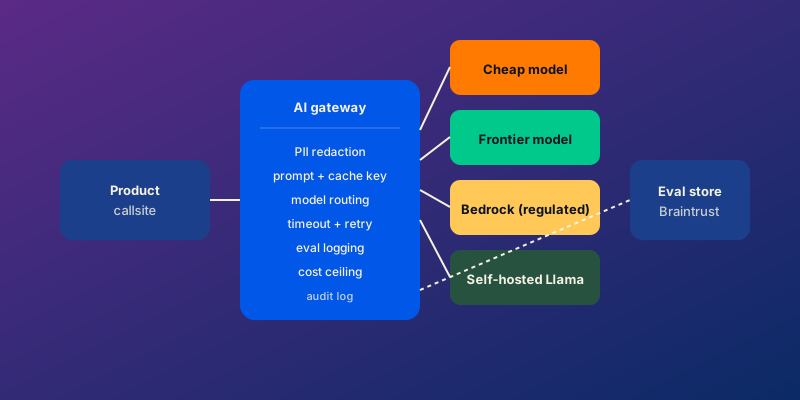
Most LLM features I see in B2B SaaS are demos. They work for the founder’s screen recording, they fall over the moment a real customer hits them with a real prompt, a real edge case, or a real cost ceiling. The gap between demo and production for an AI feature is mostly engineering, not prompt engineering.
This is what we ship now at Dashhold when a team asks us to add AI features to their product. Not a prototype. The production-grade shape that survives load, cost pressure, and the inevitable regulator review.
The AI gateway is the part that pays for itself
The mistake I see most often: the application calls OpenAI’s SDK directly from the request handler. It works on day one. By month three, the team is debugging a fan-out of issues — variable latency, cost spikes, missing eval coverage, no fallback when the API has an outage, no audit log when a customer asks “why did the model return that.”
The shape that pays for itself: an AI gateway service that sits between every product callsite and every model provider.
interface AiGateway {
  complete(req: {
    capability: string;            // "summarize_ticket", "classify_intent"
    tenantId: string;
    userId: string;
    inputs: Record<string, unknown>;
    options?: { maxTokens?: number; temperature?: number };
  }): Promise<{
    output: unknown;
    model: string;
    latencyMs: number;
    costUsd: number;
    cacheHit: boolean;
  }>;
}
The gateway is one service. Every product callsite goes through it. Every feature that needs the model — summarization, classification, drafting, search — calls complete() with a capability name, and the gateway handles everything else.
What “everything else” includes:
- PII redaction at the boundary. Strip emails, phone numbers, SSNs, credit-card-shaped strings before the prompt leaves your network.
- Prompt fingerprinting and caching. Identical inputs return identical outputs from the cache; cuts cost dramatically on common queries.
- Model routing. Pick the right model for the request — cheap for the easy 80%, frontier for the hard 20%.
- Timeout and retry. Bound every request. Retry with exponential backoff on transient failures. Fail fast on persistent ones.
- Eval logging. Every input and output goes to the eval store, with the capability name and the model used.
- Cost ceiling. Per-tenant and per-capability budgets, enforced before the call to the provider.
- Audit log. Every input, output, and decision path, retained per the policy your regulator demands.
That is one service. Adding the seventh feature that uses a model becomes a capability registration, not seven new code paths to maintain.
Model routing is the cost lever
Frontier models are expensive. Cheap models are cheap. Most production AI features can use cheap models for the bulk of traffic and reserve frontier models for the cases that genuinely need them.
The pattern we ship: a routing layer that picks a model per request based on capability, request shape, and policy.
- Easy classification, summarization, structured generation: GPT-4o-mini, Claude Haiku, Mistral Small. Cheap, fast, accurate enough.
- Hard reasoning, multi-step planning, complex extraction: GPT-4o, Claude Sonnet, Gemini 2 Pro. More expensive, more capable.
- Regulated environments where data sovereignty matters: Bedrock (with the BAA / data-handling agreements), Azure OpenAI. Same models, different contracts.
- Self-hosted when sovereignty or unit economics demand it: Llama 3 70B, Mistral Mixtral, Qwen. Higher operational overhead, lower per-call cost at high volume.
Adding a new provider becomes a new adapter behind the same complete() interface. The product code never knows which model fired.
The savings are real. On a recent build, we moved 80% of traffic from a frontier model to a small one with a routing rule based on input length plus capability classification. Cost dropped 75%. Quality dropped under 2% on the eval suite. That is a one-week change with a multi-quarter payback.
Eval-driven prompt engineering
The biggest difference between a demo and a production AI feature is eval coverage. A demo has the founder testing 10 prompts. A production feature has 200+ eval cases that run on every prompt change.
The shape we ship:
- An eval store — Braintrust, LangSmith, or a small in-house dataset. Every input/output pair from production gets sampled into the store with a capability label.
- A graded eval suite per capability. Hand-written cases for the obvious ones, plus cases drawn from real production traffic. Each case has an expected output shape and a graded score (1–5 for quality, plus pass/fail on schema compliance).
- Eval runs on every prompt PR. The CI runs the suite against the new prompt, the old prompt, and a regression baseline. Differences are flagged before merge.
- Periodic regression runs. Eval suite runs daily against production traffic samples. Drift triggers an alert.
Without this, prompt changes are guesswork and model upgrades are coin flips. With it, the team can ship prompt iterations and model upgrades with the same confidence as code changes.
Safety patterns that survive a review
For regulated platforms — fintech, healthcare, anything with PHI or financial data — the AI safety bar is higher. Three patterns we treat as non-negotiable.
PII redaction at every boundary. Inputs are scrubbed before they leave your VPC. Outputs are scanned before they reach the user. We use Presidio for the redaction layer, plus regex backstops for the high-confidence patterns (SSN, credit cards, BBANs).
Structured generation with output evaluators. Models return JSON that conforms to a schema. Evaluators run server-side to confirm the schema is valid, the output is grounded in the input, and the output does not contain PII. Non-conforming outputs are retried with a more strict prompt or fall back to a non-AI path.
Audit logging that survives discovery. Every input, output, model used, eval score, and decision path goes to an append-only audit log. Stored encrypted, retained per the regulator’s policy, queryable by the compliance team. We have used the same structure across PCI DSS, SOC 2, and HIPAA-shaped engagements.
Latency budgets and the user experience
LLM features feel slow to users in a way that traditional features do not. A 1.5-second wait for a “summarize this ticket” button feels much longer than a 1.5-second page load. The patterns that help:
Stream tokens, do not wait. Server-sent events from the gateway to the front-end, rendered as the model produces them. Users tolerate streamed latency. Blocked latency feels broken.
Prefetch the obvious cases. If a customer is on a ticket view, prefetch the AI summary in the background. By the time they click the button, it is cached.
Cache aggressively at the prompt-fingerprint layer. Identical inputs across customers can hit the same cache key when there is no PII. Most “summarize this article”-shaped capabilities benefit.
Set p95 latency targets per capability. Customer-facing AI features: under 1.5s p95. Background AI features (triage, classification): under 3s p95. Past those numbers, users perceive the feature as broken regardless of accuracy.
What ships in the first sprint
When a team comes to us with an AI feature in mind, the first sprint typically delivers:
- The AI gateway service with one capability registered.
- PII redaction at the input boundary.
- Prompt fingerprint caching.
- Two model adapters (one cheap, one frontier).
- Routing rules per capability.
- Eval store with 20–30 hand-written cases.
- Cost-per-request and latency-per-request metrics on every call.
- Audit logging on every input/output pair.
After this the team has a working AI feature with predictable cost, latency, and an eval suite. Subsequent sprints add more capabilities, more sophisticated routing, and the operator-side surfaces for compliance.
Common ways teams get this wrong
- SDK calls scattered across the codebase. Centralize through one gateway.
- No eval coverage. Every prompt change is a coin flip.
- One model for every capability. Frontier models on cheap-classification tasks burn money.
- No PII redaction. First incident is a discovery event.
- Sync waiting on the model. Stream or fail.
- No cost ceilings. First runaway request is a four-figure surprise.
- Cache without invalidation. Stale outputs feel worse than slow ones.
Frequently asked questions
Should I use OpenAI, Anthropic, or self-hosted?
Whichever the engagement actually needs. OpenAI for ecosystem maturity. Anthropic for stronger safety defaults and better long-context behavior on Claude Sonnet. Self-hosted when sovereignty or unit economics demand it. The gateway pattern means the choice is reversible.
How do I keep AI feature costs predictable?
Three patterns. Model routing for cost optimization. Per-tenant cost ceilings with structured fallbacks. Per-capability cost-per-request alerts. Together those three keep the bill bounded even when traffic spikes.
Do I need RAG for every AI feature?
No. Most AI features in B2B SaaS are classification, summarization, or drafting tasks that work on data already in the request. RAG matters when the model needs to reach knowledge outside the request, which is a smaller subset than the hype suggests.
How long does an AI feature take to ship?
A focused first feature — gateway + one capability + evals + audit — takes 4 to 6 weeks with a senior engineering pod. A platform-grade AI layer with multi-provider routing, fine-grained safety, and full operator tooling typically takes 3 to 5 months.
Closing thought
LLM features in B2B SaaS earn their keep when the engineering around them is production-grade — gateway, evals, routing, safety, cost ceilings, audit. The model is the easy part. The infrastructure around it is the part that decides whether the feature ships, scales, and stays out of the headlines.
If you want this thinking applied to your product, our AI feature engineering practice ships these patterns as the default starting shape. A 30-minute strategy call is the fastest way to figure out which capabilities are worth building first.